> For the complete documentation index, see [llms.txt](https://docs.hashliquid.com/llms.txt). Markdown versions of documentation pages are available by appending `.md` to page URLs; this page is available as [Markdown](https://docs.hashliquid.com/merchants/become-a-merchant.md).
# How do I apply to become a HashLiquid Merchant?
Apply to become a HashLiquid Merchant so you can post Advertisements.
You must become a HashLiquid Merchant before you can post Advertisements. Select **Post Ads** to open the **P2P Merchant Application Form**.
## What do I need to provide?
Prepare:
* [ ] Your Telegram username
* [ ] Information about your previous OTC or P2P trading experience
* [ ] A recording of your trading history, if requested by the form
* [ ] An identity declaration video
* [ ] A bank statement covering the last three months
* [ ] Both sides of your photo ID
{% hint style="info" %}
Use clear, accurate files that belong to you. Follow the declaration text and file requirements shown on the application form.
{% endhint %}
## Submit your application
{% stepper %}
{% step %}
**Open the application form**
Sign in to HashLiquid and select **Post Ads**.
{% endstep %}
{% step %}
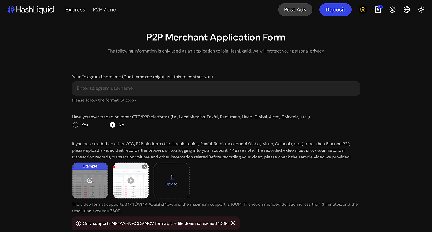
**Enter your Telegram username**
Enter your Telegram username in the format shown on the page.
{% endstep %}
{% step %}
**Share your trading experience**
Confirm whether you have traded on another OTC or P2P platform.
Telegram username and prior P2P trading experience
{% endstep %}
{% step %}
**Upload your trading history (if required)**
If required, upload a recording showing your account and historical trading activity on that platform.
{% endstep %}
{% step %}
**Record your identity declaration**
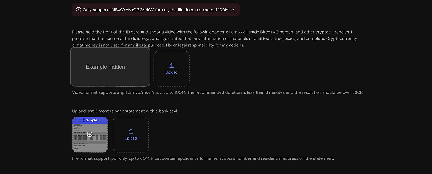
Upload a video of yourself holding the front of your ID and reading the declaration shown on the form.
{% endstep %}
{% step %}
**Upload your bank statement**
Upload a bank statement for the last three months. It must show your full name, account number, and residential address.
Identity declaration video and bank statement uploads
{% endstep %}
{% step %}
**Upload your photo ID**
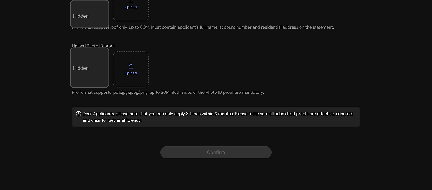
Upload both sides of your photo ID.
Photo ID upload and application limit
{% endstep %}
{% step %}
**Confirm**
Review the application, then select **Confirm**.
{% endstep %}
{% endstepper %}
{% hint style="warning" %}
You can submit up to three Merchant applications within three months. Check every file carefully before selecting **Confirm**.
{% endhint %}
## After you apply
Submission does not guarantee approval. After the review, HashLiquid will contact you through the Telegram username provided. If approved, you can access CIPHER to manage Advertisements, orders, Disputes, and your Merchant Funding Account.
## Related articles
* [How do I complete identity verification on HashLiquid?](/getting-started/identity-verification.md)
* [How do I add, edit, or remove a Payment Method?](/getting-started/payment-methods.md)
---
# Agent Instructions
This documentation is published with GitBook. GitBook is the documentation platform designed so that both humans and AI agents can read, navigate, and reason over technical content effectively. Learn more at gitbook.com.
## Querying This Documentation
If you need additional information that is not directly available in this page, you can query the documentation dynamically by asking a question.
Perform an HTTP GET request on the current page URL with the `ask` query parameter, and the optional `goal` query parameter:
```
GET https://docs.hashliquid.com/merchants/become-a-merchant.md?ask=&goal=
```
`ask` is the immediate question: it should be specific, self-contained, and written in natural language.
`goal` is optional and describes the broader end goal you are ultimately trying to accomplish on behalf of the user. GitBook uses it to tailor the answer towards what is most useful for that goal.
The response will contain a direct answer to the question and relevant excerpts and sources from the documentation.
Use this mechanism when the answer is not explicitly present in the current page, you need clarification or additional context, or you want to retrieve related documentation sections.